

-
Feeling lucky? Check out the AK 24th Anniversary Giveaway thread and join in the fun!
You are using an out of date browser. It may not display this or other websites correctly.
You should upgrade or use an alternative browser.
You should upgrade or use an alternative browser.
What are these things?
- Thread starter malanga
- Start date


Register to hide this ad

KlipschFan61
Smooth Jazzer
The second one is a dust bug.

Radfordman
Super Member
Thought the dust bug was similar to that but Acrylic (Perspex/ Plexiglas) arm. I still have a couple of them. Here is a picture of the Watts Dust Bug. I see that there is also a REK-O-KUT dust bug, but this looks different to Malanga's second pic.
Last edited:

KlipschFan61
Smooth Jazzer
Thought the dust bug was similar to that but Acrylic (Perspex/ Plexiglas) arm. I still have a couple of them. Here is a picture of the Watts Dust Bug. I see that there is also a KEK-O-KUT dust bug, but this looks different to Malanga's second pic.
Dust bug is a pretty generic term for me these days. I got one of those cheapy jobs off of eBay and it worked ok. Definitely not as nice as the older ones for sure.
Radfordman
Super Member
Interesting, I did a worldwide search for Dust Bug on e bay and came up with 58 results. Only one was a record cleaning device and was a Watts Dust Bug.
The Watts one came with a bottle of Anti-Static solution. It was pretty effective. The only downside was the mark the rubber sucker could make on the turntable paintwork over a period of time.
I was looking to see if I could find some more bugs! for my many decks.
The Watts one came with a bottle of Anti-Static solution. It was pretty effective. The only downside was the mark the rubber sucker could make on the turntable paintwork over a period of time.
I was looking to see if I could find some more bugs! for my many decks.

danj
modern primitive
The first pic is a device to add end-of-record tonearm lift to manual tables. The second picture is of a record cleaning arm. It is not a Dust-Bug, which was a product of Cecil Watts, Ltd., but it is similar. It lightly cleans the record as it's playing and is meant to be used with an antistatic fluid, a little drop of which is supposed to be placed on the velvet pad. Similar arms were marketed by many companies.
I use a real Dust-Bug and have for years. Those knock-off arms don't go for much but a real Watts Dust-Bug usually sells for around $40 these days, assuming its mint and complete. It's arm is made of plexiglas or Perspex. It was part of a complete record care system marketed by Watts. They faded from the market with the advent of CDs.
That record cleaner isn't worth much but is a very useful item. The tonearm lift is pretty rare and escalating in value. If I had one it would go into daily use on my Thorens.
I use a real Dust-Bug and have for years. Those knock-off arms don't go for much but a real Watts Dust-Bug usually sells for around $40 these days, assuming its mint and complete. It's arm is made of plexiglas or Perspex. It was part of a complete record care system marketed by Watts. They faded from the market with the advent of CDs.
That record cleaner isn't worth much but is a very useful item. The tonearm lift is pretty rare and escalating in value. If I had one it would go into daily use on my Thorens.
Radfordman
Super Member
The first pic is a device to add end-of-record tonearm lift to manual tables. The second picture is of a record cleaning arm. It is not a Dust-Bug, which was a product of Cecil Watts, Ltd., but it is similar. It lightly cleans the record as it's playing and is meant to be used with an antistatic fluid, a little drop of which is supposed to be placed on the velvet pad. Similar arms were marketed by many companies.
I use a real Dust-Bug and have for years. Those knock-off arms don't go for much but a real Watts Dust-Bug usually sells for around $40 these days, assuming its mint and complete. It's arm is made of plexiglas or Perspex. It was part of a complete record care system marketed by Watts. They faded from the market with the advent of CDs.
That record cleaner isn't worth much but is a very useful item. The tonearm lift is pretty rare and escalating in value. If I had one it would go into daily use on my Thorens.
Ah yes Cecil Watts, now I remember. I have the Parostatic cleaner as well, very good too, one unscrewed end, put some ant- static solution in it.
Shown here with Cecil Watts dust Bug:
http://www.audiokarma.org/forums/showthread.php?t=64394

malanga
Well-Known Member
How does it work. I am curious.The first pic is a device to add end-of-record tonearm lift to manual tables.
The second picture is of a record cleaning arm. It is not a Dust-Bug, which was a product of Cecil Watts, Ltd., but it is similar. It lightly cleans the record as it's playing and is meant to be used with an antistatic fluid, a little drop of which is supposed to be placed on the velvet pad. Similar arms were marketed by many companies.
I thought it was some type of cleaning device. It is made by Audio Technica. It didn't seem to do much, but now I understand I need some antistatic liquid. Where could I find this?
That record cleaner isn't worth much but is a very useful item. The tonearm lift is pretty rare and escalating in value. If I had one it would go into daily use on my Thorens.
Good thing I didn't toss it like I almost did when I got the turntable!

I did find one on e-bay, but it looks like mine is missing a piece. i do not have that base as in the picture:
http://cgi.ebay.com/Audio-Technica-...ryZ48648QQssPageNameZWDVWQQrdZ1QQcmdZViewItem

Splatter Pak
High-End Scrounger
The cleaner is not a Dust Bug, it is an Audio Cleanica - I have one myself. Yes, it's made by Audio Technica.

vinylover
Its becoming a problem
The Audio Technica cleaner did come with an anti static liquid that you put a drop in the little hole on the one side of the red cylinder. I would think any anti static treatment liquid would work. I haven't used mine in years. Always seems to go to the middle of the record pretty fast
Steve
Steve

justw
Well-Known Member
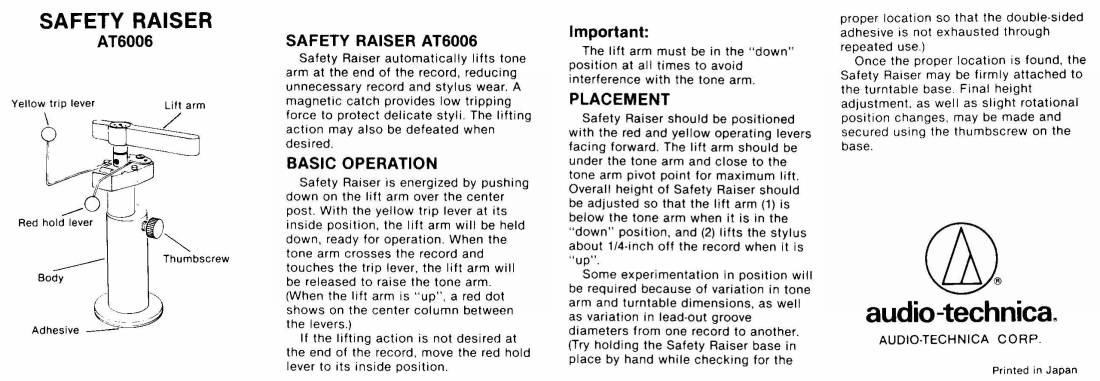
It's called a "Safety Raiser" by Audio Technica circa 1978. You press down on the lifter part and push the one arm back and it latches on the other. When the tonearm gets to the end of the record it trips and raises the stylus off the record. Very valuable and, IMHO, nobody did it better.


Blue Shadow
Waiting for Vintage Gear from this century
Actually it is a modified safety raiser as the arm is a replacement unit. The original arm is a black plastic and a lot thicker. Maybe the reason it was changed. The unit can be locked in the down position to keep it from tripping if that is wanted. A nice upgrade to a manual table.
http://www.borrett.id.au/images/interests/audio-technica_at-6006a.jpg
http://www.borrett.id.au/images/interests/audio-technica_at-6006a.jpg
The "things" are Audio Technice turntable accessories. The little gadget is a AT6006a Safety Raiser (tonearm lift). The second item is a arm to clean your lp while its playing, I forget the model number off hand. Audio Technica and Signet both had a lot of great vinyl related accessories back in the 70s & 80s that now command some serious $. They were all well made and did the job intended. Back then the prices weren't cheap and if you check today you wouldn't believe what these items are going for.

mech986
Lunatic Member
Thorens had a similar device for arm lift called the Q-Up, and it looks surprisingly like a flip-top lighter in my mind (warped as it is).
The AT Safety Raiser (similar to a Gillette? in name) is a nifty little device and works well because it's a bit more sensitive to lightweight arm motion.
As noted above, all of these nice vinyl accessories were made by folks who really were into vinyl and its playback on manual tables. Demand and relative rarity have now pused these two lift devices just short of a C-note in some cases.
So, a nice surprise and added value for the OP. Where's pics of the table?
bart
The AT Safety Raiser (similar to a Gillette? in name) is a nifty little device and works well because it's a bit more sensitive to lightweight arm motion.
As noted above, all of these nice vinyl accessories were made by folks who really were into vinyl and its playback on manual tables. Demand and relative rarity have now pused these two lift devices just short of a C-note in some cases.
So, a nice surprise and added value for the OP. Where's pics of the table?
bart
malanga
Well-Known Member
Thorens had a similar device for arm lift called the Q-Up, and it looks surprisingly like a flip-top lighter in my mind (warped as it is).
The AT Safety Raiser (similar to a Gillette? in name) is a nifty little device and works well because it's a bit more sensitive to lightweight arm motion.
As noted above, all of these nice vinyl accessories were made by folks who really were into vinyl and its playback on manual tables. Demand and relative rarity have now pused these two lift devices just short of a C-note in some cases.
So, a nice surprise and added value for the OP. Where's pics of the table?
bart
You can see pics at this link: http://www.audiokarma.org/forums/showthread.php?t=187946
DOes anyone have one of these Audio Technica tone arm lifts? Mine is missing the base, and I was hoping for the dimensions so that I can try and make a new one so I could use the lift. Thanks!
Blue Shadow
Waiting for Vintage Gear from this century
If you have the piston and pins piece, all you need is to make a unit to hold that piece. Simple concept, you can make the measurements.
Base disk big enough to support a chunk of double-sided tape that will hold the unit when it gets slammed by the tonearm in the lead out groove, say 20mm diameter. Vertical rod, 7mm diameter x 20mm lenght, attached perpendicularly to this base which is tall enough to allow mounting of the tonearm lift at tonearm lift height (vaires by TT) and big enough in diameter to allow you to drill a hole in it to hold the piston (measure your piston) and another hole, which is tapped, to allow some kind of set screw.
The AT unit has the hole for the piston off center, using a larger diameter rod will make this unnecessary as the one on the AT is that way to give the set screw (a thumb screw in this case) some metal for the threads.
The length of the rod is dependent on the TT. The AT unit has a short one that is only a bit longer than the piston section that will go into it, but they supply a 3/8ths" thick disk the diameter of the mounting disk to use to raise the unit higher if needed.
The set screw is close to the top of the drilled rod so that there is vertical adjustment of the piston and still enough piston in the rod for the set screw to grab it and hold it.
Really very simple to draw out and design yourself.
1) flat disk to mount to table
2) rod to mount perpendicular on the disk
3) rod drilled the diameter of the piston
4) rod drilled on one end to install set screw for piston
5) tap threads in the set screw location based on your set screw choice
6) set up the unit on the tt and see what length you need to mount the AT properly
7) cut the rod to correct length (end opposite the set screw)
8) attach rod to base
9) install piston to rod
10) determine location on TT for the unit. (this may affect base diameter and probably why the AT one is only 20mm)
11) read instruction manual I posted for the AT unit to set up
12) check operation
13) enjoy not having to jump every time a record ends.
Base disk big enough to support a chunk of double-sided tape that will hold the unit when it gets slammed by the tonearm in the lead out groove, say 20mm diameter. Vertical rod, 7mm diameter x 20mm lenght, attached perpendicularly to this base which is tall enough to allow mounting of the tonearm lift at tonearm lift height (vaires by TT) and big enough in diameter to allow you to drill a hole in it to hold the piston (measure your piston) and another hole, which is tapped, to allow some kind of set screw.
The AT unit has the hole for the piston off center, using a larger diameter rod will make this unnecessary as the one on the AT is that way to give the set screw (a thumb screw in this case) some metal for the threads.
The length of the rod is dependent on the TT. The AT unit has a short one that is only a bit longer than the piston section that will go into it, but they supply a 3/8ths" thick disk the diameter of the mounting disk to use to raise the unit higher if needed.
The set screw is close to the top of the drilled rod so that there is vertical adjustment of the piston and still enough piston in the rod for the set screw to grab it and hold it.
Really very simple to draw out and design yourself.
1) flat disk to mount to table
2) rod to mount perpendicular on the disk
3) rod drilled the diameter of the piston
4) rod drilled on one end to install set screw for piston
5) tap threads in the set screw location based on your set screw choice
6) set up the unit on the tt and see what length you need to mount the AT properly
7) cut the rod to correct length (end opposite the set screw)
8) attach rod to base
9) install piston to rod
10) determine location on TT for the unit. (this may affect base diameter and probably why the AT one is only 20mm)
11) read instruction manual I posted for the AT unit to set up
12) check operation
13) enjoy not having to jump every time a record ends.


